Overview
Purpose
Section titled “Purpose”This walkthrough documents how to deploy and operate the route53-multi-account-dns-demo — a Terraform
HashiCorp Terraform — six account stacks in the source demo repo. Phased apply creates authorizations before workload associations. demo for classic Route 53
Amazon Route 53 — hosts the shared Platform_Zone; classic VPC association authorization lets workload VPCs resolve the same private records. private DNS sharing using .
A single private hosted zone
Private Hosted Zone — resolves DNS only from associated VPCs. This demo uses one authoritative PHZ in the network account. (Platform_Zone
Shared private hosted zone `platform.demo.local` in the Network_Account — the only place `api` and `db` records are defined.) in the Network_Account
AWS account that owns Platform_Zone, DNS records, and cross-account VPC_Association_Authorization resources. serves DNS records; workload VPCs in dev and sandbox associate with that zone across two regions.
The pattern uses CreateVPCAssociationAuthorization / AssociateVPCWithHostedZone. It does not use Route 53 Profiles
Centralised Route 53 association lifecycle — alternative to classic authorization; not used in this walkthrough., AWS RAM
AWS Resource Access Manager — can share hosted zones; not part of this classic pattern., Transit Gateway, or orchestration scripts.
Architecture at a glance
Section titled “Architecture at a glance”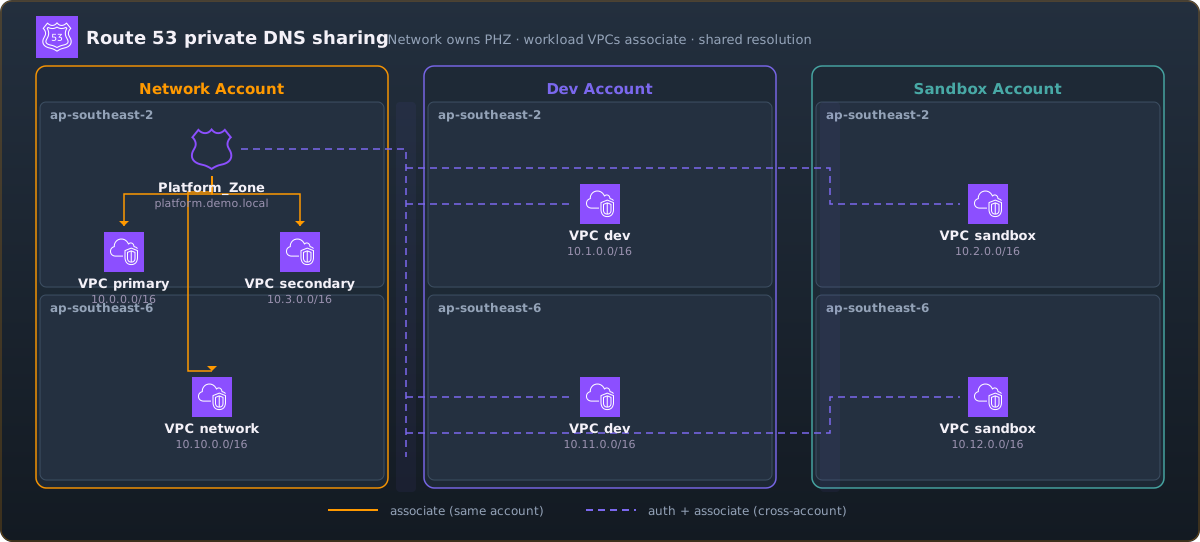
Three AWS accounts share one Platform_Zone
Shared private hosted zone `platform.demo.local` in the Network_Account — the only place `api` and `db` records are defined. (platform.demo.local). The network account owns the PHZ
Private Hosted Zone — resolves DNS only from associated VPCs. This demo uses one authoritative PHZ in the network account. in ap-southeast-2; dev and sandbox VPCs in both regions associate after cross-account
Dev and sandbox VPCs in separate AWS accounts associate with one network-owned PHZ after explicit authorization. authorization. Same-account VPCs in the network account associate directly.
Four association scenarios
Section titled “Four association scenarios”| Scenario | Example stack | Authorization required? |
|---|---|---|
| Cross-account, same region | dev-apse2 | Yes |
| Cross-account, cross-region | dev-apse6 | Yes (correct vpc_region) |
| Same-account, cross-region | network-apse6 | No |
| Same-account, same region (second VPC) | network secondary VPC | No |
Accounts, regions, and stacks
Section titled “Accounts, regions, and stacks”Three AWS accounts, two regions (ap-southeast-2, ap-southeast-6), six Terraform stacks:
| Stack | Account | Region | CIDR |
|---|---|---|---|
network | network | ap-southeast-2 | 10.0.0.0/16 + 10.3.0.0/16 |
network-apse6 | network | ap-southeast-6 | 10.10.0.0/16 |
dev-apse2 | dev | ap-southeast-2 | 10.1.0.0/16 |
dev-apse6 | dev | ap-southeast-6 | 10.11.0.0/16 |
sandbox-apse2 | sandbox | ap-southeast-2 | 10.2.0.0/16 |
sandbox-apse6 | sandbox | ap-southeast-6 | 10.12.0.0/16 |
Shared DNS records (network PHZ
Private Hosted Zone — resolves DNS only from associated VPCs. This demo uses one authoritative PHZ in the network account. only):
api.platform.demo.local→10.0.1.10db.platform.demo.local→10.0.1.20
Deployment is manual and phased with boolean feature flags
Boolean variables (`enable_phz`, `enable_zone_association`, etc.) that gate phased deploy steps in each stack.. Verification uses seven Test_EC2
One minimal EC2 per stack (seven total) for in-VPC DNS checks via SSM Session Manager and `dig`. instances (one per VPC) with SSM Session Manager and dig.
Phased dependency model
Section titled “Phased dependency model”| Phase | Depends on | Why |
|---|---|---|
| Phase 2a | Phase 1 | Needs real workload vpc_id values for authorizations |
| Phase 2b | Phase 2a | Needs zone_id from network stack |
| Phase 3 | Phase 2a | Needs zone_id and authorizations before cross-account associate |
Walkthrough path
Section titled “Walkthrough path”- Why Classic — when this pattern fits and when it does not
- Prerequisites — accounts, profiles, Terraform versions
- Pre-flight — checks before every apply
- Deployment Phases — Phase 1 through Phase 3
- Verification — seven DNS tests
- Troubleshooting — common failure modes
- Teardown — dependency-safe cleanup
For conceptual depth before Phase 2a, read System Overview and Association Scenarios.
Version alignment
Section titled “Version alignment”This walkthrough documents source demo baseline main.
When the demo repository changes:
- Note the new tag or branch in this section.
- Update command paths and variable names in affected walkthrough pages.
- Run
npm run validateandnpm run buildin this repo. - Re-run the demo phases against the updated source to confirm accuracy.
Intentionally excluded
Section titled “Intentionally excluded”The source demo deliberately omits (see also Why Classic):
- Route 53 Profiles
Centralised Route 53 association lifecycle — alternative to classic authorization; not used in this walkthrough. and AWS RAM
AWS Resource Access Manager — can share hosted zones; not part of this classic pattern. - Resolver query logging, DNS Firewall, outbound resolver rules
- Alias records, DNSSEC, failover/latency routing
- Second PHZ or regional zone copies
- Orchestration or verification scripts