What are S3 Annotations?
Traditional pattern: image in S3, metadata in a database or sidecar index. S3 Annotations attach structured metadata directly to the object. Official AWS docs and launch posts are on External links.
S3 object (JPEG) └── annotation namespace "environment" └── JSON payload (camera, time, filters, provenance)Why this matters for the demo
Section titled “Why this matters for the demo”| Idea | How the demo shows it |
|---|---|
| Metadata travels with the object | Annotations are written on the same key as the JPEG |
| No extra DB required (default) | API reads GetObjectAnnotation per object |
| Filterable in apps | Gallery filters on annotation fields — in application code, not via a native S3 query |
| Provenance | source_bucket, source_key, ingest_run_id on every object |
S3 Annotations in practice
Section titled “S3 Annotations in practice”No server-side query
Section titled “No server-side query”S3 Annotations do not support “find all objects where day_phase=dusk.” There is no annotation search API across a bucket.
This demo instead:
- Lists object keys in the private bucket (
ListObjectsV2) - Calls
GetObjectAnnotationper key (parallel in the API Lambda) - Filters in Lambda on the parsed JSON, then paginates
| Tradeoff | Detail |
|---|---|
| Benefit | Metadata travels with the object; no sidecar file or separate metadata DB required |
| Cost | Query and filter are application work — roughly N objects → N annotation reads per gallery/API request |
| Scale pattern | Optional DynamoDB mirror (enable_dynamodb) acts as a denormalized index; S3 remains canonical |
Say plainly: annotations colocate metadata; they do not replace a query engine.
Annotations vs other S3 metadata
Section titled “Annotations vs other S3 metadata”| Approach | What it is | Why this demo uses annotations instead |
|---|---|---|
| S3 object tags | Up to 10 key/value pairs per object; string values; tag-based filtering APIs | Too small for structured JSON; not ideal for rich provenance + filter fields |
User metadata (PutObject headers) | Key/value headers set at upload time | Awkward to update after copy; not the structured annotation workflow |
| Sidecar files | image.jpg + image.json as separate keys | Metadata can drift from the image; lifecycle and permissions are harder to keep aligned |
| S3 Annotations | Named namespace + payload blob on the same object | JSON metadata versioned with the asset; put_object_annotation / get_object_annotation API |
Namespaces
Section titled “Namespaces”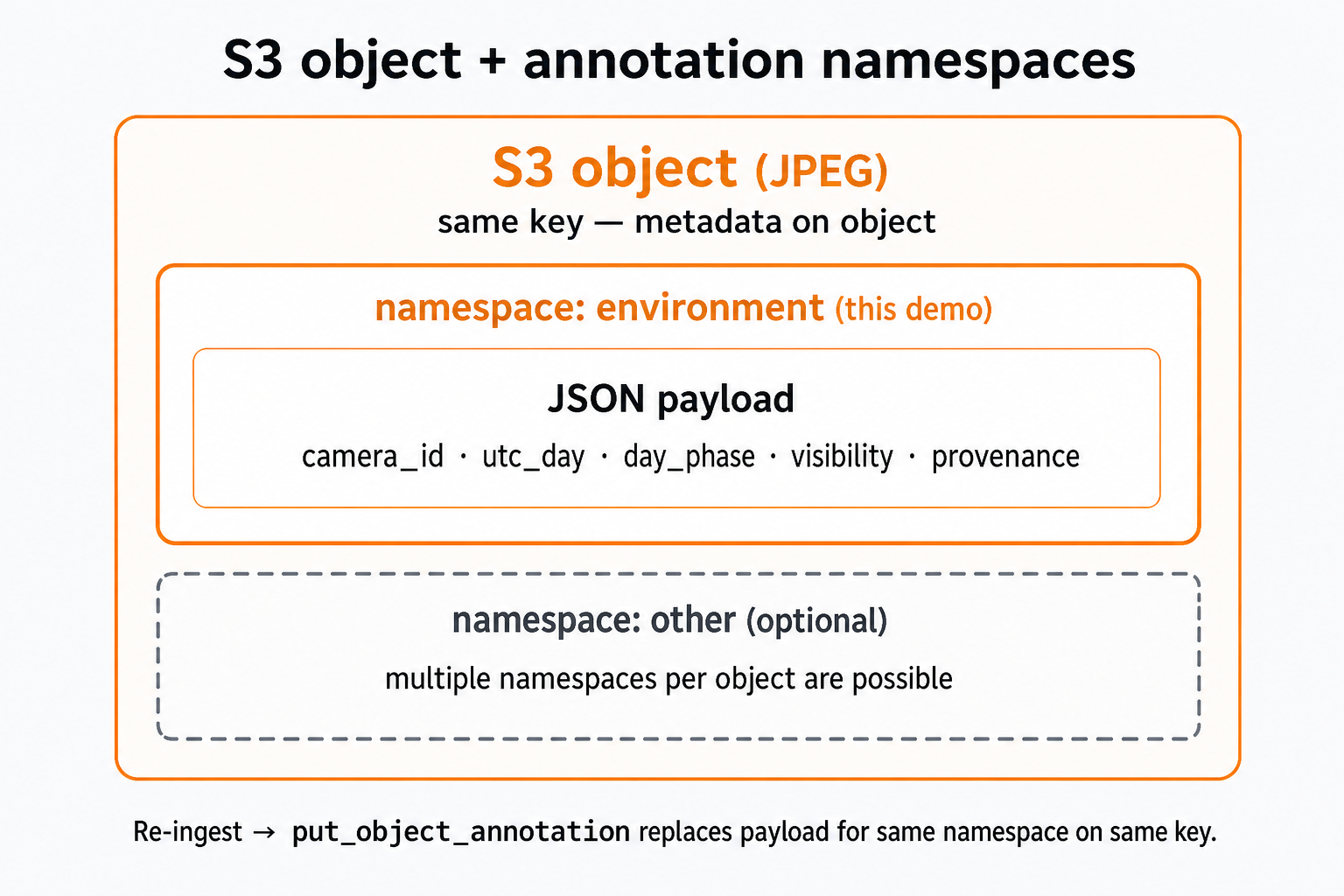
To see which namespaces exist on an object, from the demo repository root:
BUCKET="volcano-annotations-demo-private"KEY="camera/volcano/images/2026/TKAH/TKAH.01/2026.170/2026.170.0000.00.TKAH.01.jpg"
aws s3api list-object-annotations \  --bucket "$BUCKET" \  --key "$KEY"
Sample output (Te Kaha image 2026.170.0000.00.TKAH.01.jpg after ingest):
{ "Annotations": [ { "AnnotationName": "environment", "LastModified": "2026-06-19T20:16:21+00:00", "ETag": "\"2ee3e9a5700bfd2e2307f6d1202e5755\"", "ChecksumAlgorithm": ["CRC32"], "Size": 480 } ], "AnnotationCount": 1, "Bucket": "volcano-annotations-demo-private", "Key": "camera/volcano/images/2026/TKAH/TKAH.01/2026.170/2026.170.0000.00.TKAH.01.jpg"}The demo uses a single namespace — environment — with a JSON payload (480 bytes). Use get-object-annotation (below) to read the payload itself.
API surface (demo vs full feature)
Section titled “API surface (demo vs full feature)”Helpers: lambda/shared/s3_annotations.py wraps the boto3 annotation calls.
| S3 API | In this demo? | In walkthrough / code |
|---|---|---|
PutObjectAnnotation | Yes | Ingest Lambda — put_object_annotation() |
GetObjectAnnotation | Yes | API Lambda — get_object_annotation() |
ListObjectAnnotations | No | CLI example above; alternative to assuming every key has environment |
DeleteObjectAnnotation | No | Not needed; terraform destroy removes objects + annotations |
IAM permissions
Section titled “IAM permissions”Annotation access is explicit IAM on the private bucket (terraform/iam.tf):
| Role | Actions | Purpose |
|---|---|---|
| Ingest Lambda | s3:PutObject, s3:PutObjectAnnotation, s3:ListBucket | Copy JPEG, write annotation |
| API Lambda | s3:GetObject, s3:GetObjectAnnotation, s3:ListBucket | Read annotation, presign image |
Platform limitations
Section titled “Platform limitations”Do not assume annotations work everywhere S3 does. AWS documents cases where annotations are not supported, including:
- S3 Inventory Reports
- S3 Storage Lens
- S3 File Gateway
- Amazon FSx
- S3 on Outposts
- S3 Express One Zone (directory buckets)
Core API surface
Section titled “Core API surface”| Operation | Function | Used by |
|---|---|---|
| Write | put_object_annotation() | Ingest Lambda |
| Read | get_object_annotation() | API Lambda |
Namespace: environment (set via ANNOTATION_NAMESPACE on ingest).
Inspect an annotation
Section titled “Inspect an annotation”After ingest, pick any object key from the private bucket. Run from the demo repository root (clone terraform-aws-s3-annotations-demo — the directory that contains terraform/):
BUCKET=$(terraform -chdir=terraform output -raw private_bucket_name)KEY="camera/volcano/images/2026/TKAH/TKAH.01/2026.170/2026.170.0800.00.TKAH.01.jpg"
# CLI writes the annotation payload to a file (streaming blob); metadata prints to stdout.PAYLOAD=$(mktemp)aws s3api get-object-annotation \  --bucket "$BUCKET" \  --key "$KEY" \  --annotation-name environment \  "$PAYLOAD" >/dev/null
python3 -m json.tool "$PAYLOAD"rm -f "$PAYLOAD"
Sample output (Te Kaha image 2026.170.0800.00.TKAH.01.jpg after ingest):
{ "schema_version": "1", "camera_id": "TKAH.01", "volcano_site": "TKAH", "utc_day": "2026.170", "captured_utc": "2026-06-19T08:00:00Z", "day_phase": "dusk", "visibility": "daylight", "model": "metadata-luminance-v1", "source_bucket": "geonet-open-data", "source_key": "camera/volcano/images/2026/TKAH/TKAH.01/2026.170/2026.170.0800.00.TKAH.01.jpg", "ingest_run_id": "49f52ccc-2b61-4e1b-91c0-04440e479686", "ingested_at": "2026-06-19T08:57:20Z", "updated_at": "2026-06-19T08:57:20Z"}In the S3 console: open the object → Annotations tab → namespace environment.