Project Overview
What you will build
Section titled “What you will build”This walkthrough takes an ESP32-S3
Espressif ESP32 family microcontroller — this walkthrough targets ESP32-S3-N16R8 with PlatformIO firmware. from local FIRMWARE
PlatformIO-based ESP32 application in `firmware/` — connects to Wi-Fi, syncs time, and publishes MQTT telemetry and events. setup to a hosted dashboard backed by AWS
Amazon Web Services — the cloud platform used for IoT Core, serverless ingest, storage, API, and hosting in this walkthrough. data services.
Deliverables across all phases:
- Device telemetry published over MQTT
Message Queuing Telemetry Transport — lightweight publish/subscribe protocol used between ESP32 and AWS IoT Core. to AWS IoT Core
AWS IoT Core — managed MQTT broker with X.509 device authentication for ESP32 telemetry and events. - Serverless ingest pipeline using IoT Rules
AWS IoT Rules — route incoming MQTT messages to Lambda and CloudWatch Logs for ingest and verification. , LAMBDA
AWS Lambda — processes IoT rule payloads and serves query API logic behind API Gateway. , and DYNAMODB
Amazon DynamoDB — persists telemetry and event records after Lambda ingest in Phase 2. - Query API for latest telemetry and recent button events
- Hosted dashboard that reads through API Gateway
Amazon API Gateway — exposes HTTP routes for latest telemetry and recent events. The browser reads data through API Gateway, not DynamoDB directly. and LAMBDA
AWS Lambda — processes IoT rule payloads and serves query API logic behind API Gateway.
Architecture and data flow
Section titled “Architecture and data flow”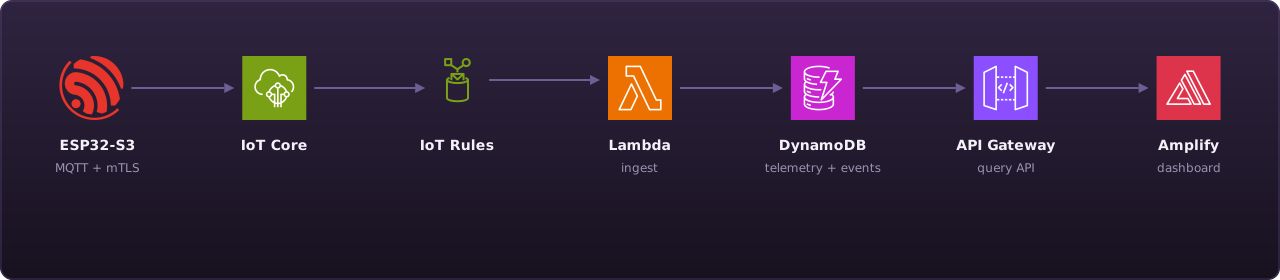
The browser consumes data through API Gateway
Amazon API Gateway — exposes HTTP routes for latest telemetry and recent events. The browser reads data through API Gateway, not DynamoDB directly. only. It does not access DYNAMODB
Amazon DynamoDB — persists telemetry and event records after Lambda ingest in Phase 2. directly.
Hosted dashboard
Section titled “Hosted dashboard”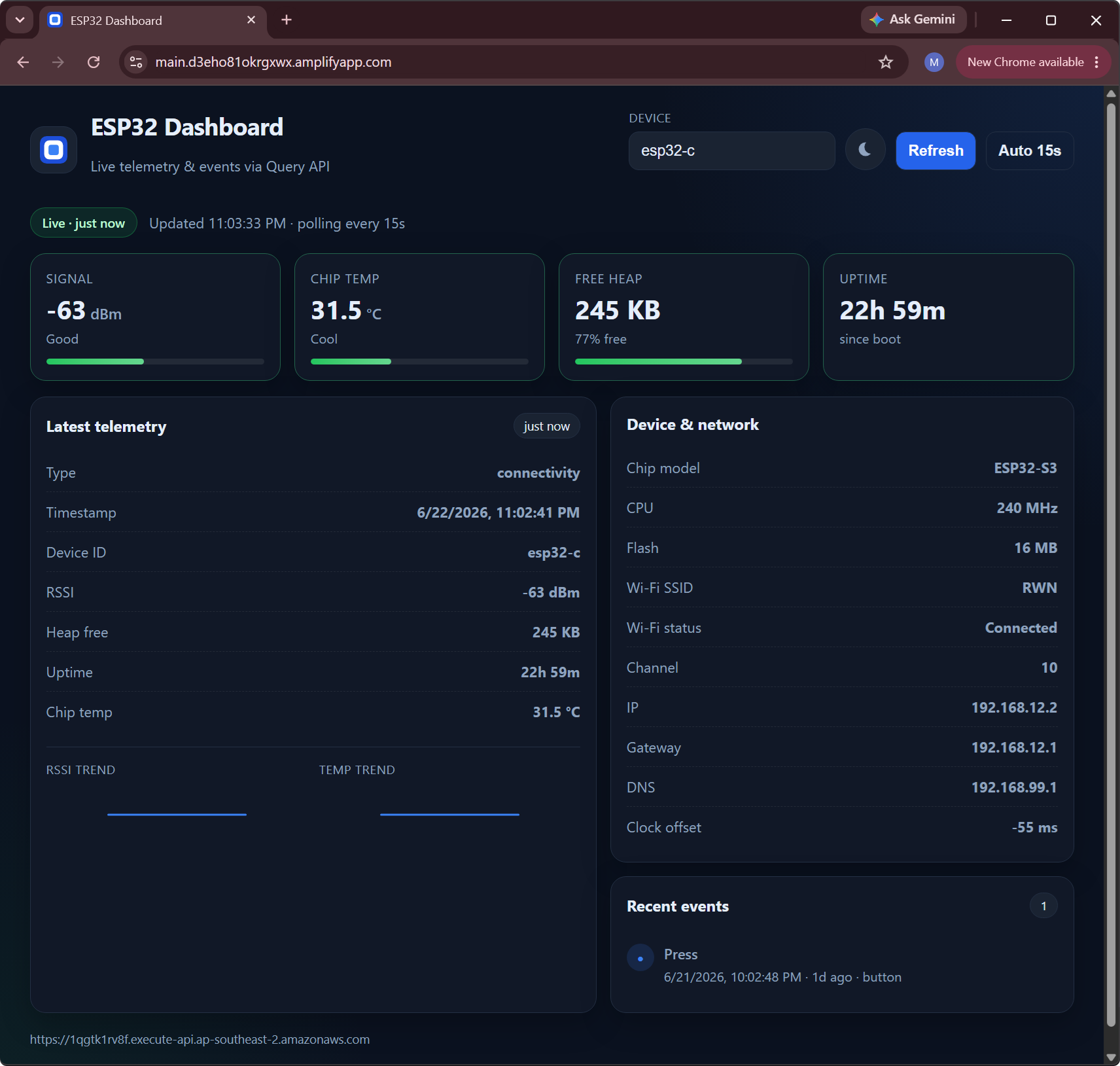
Phase 3 delivers this view — signal, chip temperature, heap, uptime, and events polled from the query API every 15 seconds. Deploy steps are in Dashboard and Hosting.
Key terms
Section titled “Key terms”| Term | Definition |
|---|---|
| Demo Repo esp32-aws-iot-demo — source repository for firmware, provisioning scripts, Terraform, and dashboard code. Commands run from its root unless stated otherwise. | Source repository esp32-aws-iot-demo — all commands run from its root unless stated otherwise |
| FIRMWARE PlatformIO-based ESP32 application in `firmware/` — connects to Wi-Fi, syncs time, and publishes MQTT telemetry and events. | PlatformIO ESP32 application in |
| IoT Policy AWS IoT Core policy — least-privilege MQTT permissions scoped to a device's Thing name and topic namespace. | Least-privilege MQTT permissions for a device certificate |
| Payload Contract JSON schema for telemetry (`type=connectivity`) and event (`type=button`, `event=press`) MQTT messages. | JSON schema for telemetry and event MQTT messages |
| PRETEST Phase 1 verification flow — Prerequisites through Cloud Verification in the sidebar (includes AWS Provisioning). Proves device-to-cloud connectivity in CloudWatch before full Terraform rollout. | Phase 1 device-to-cloud proof — complete before
TERRAFORM |
| Terraform Stack Terraform modules in `terraform/` of the demo repo — provisions the full serverless ingest and query stack. | TERRAFORM |
| THING AWS IoT Thing — logical device identity (example: `esp32-c`) bound to certificates and MQTT topics. | IoT Core |
Walkthrough phases
Section titled “Walkthrough phases”The sidebar follows three phases. Phase 1 is the PRETEST
Phase 1 verification flow — Prerequisites through Cloud Verification in the sidebar (includes AWS Provisioning). Proves device-to-cloud connectivity in CloudWatch before full Terraform rollout. — prove the device publishes to CloudWatch
Amazon CloudWatch Logs — stores IoT rule output for Phase 1 verification (`/aws/iot/esp32-demo/telemetry` and `/events`). before provisioning the full stack.
Phase 1: Zero to First Message (pretest)
Section titled “Phase 1: Zero to First Message (pretest)”Goal: provision the device, flash firmware, and confirm telemetry and button events in CloudWatch.
Sidebar sections in order:
- Introduction — architecture, phases, and key terms
- Prerequisites — host tools, AWS access, environment variables
- Security — certificate trust model and IoT policy concepts
- AWS Provisioning — CloudFormation bootstrap and device provisioning
- Firmware — source layout, modules, payload contract, build config
- Device Setup — USB permissions, build, flash, serial monitor
- Cloud Verification — tail logs and confirm Phase 1 pass criteria
Pass criteria are defined in End-to-End Validation.
Phase 2: Serverless Ingest
Section titled “Phase 2: Serverless Ingest”Goal: provision shared infrastructure with TERRAFORM
HashiCorp Terraform — provisions shared infrastructure (IoT rules fan-out, Lambda, DynamoDB, API Gateway, Amplify). and verify records persist to DYNAMODB
Amazon DynamoDB — persists telemetry and event records after Lambda ingest in Phase 2. .
Sidebar sections:
- Infrastructure — stack source layout, ingest pipeline, Terraform apply and DynamoDB validation
Phase 3: API and Dashboard
Section titled “Phase 3: API and Dashboard”Goal: validate query API endpoints and run or deploy the dashboard through AMPLIFY
AWS Amplify — hosts the walkthrough dashboard frontend and connects it to the query API URL. .
Sidebar sections:
- API and Dashboard — query API and dashboard source layouts, endpoint validation, local run and Amplify hosting
Troubleshooting, Future Improvements, and Reference apply across all phases.
See Future Improvements for possible next steps.