Health Checks in Express Mode
ALB Target Group Health Checks
Section titled “ALB Target Group Health Checks” Express Gateway Service
The aws_ecs_express_gateway_service Terraform resource that provisions an ECS service with managed ALB, auto scaling, and simplified configuration for HTTP/HTTPS web applications and APIs. relies on ALB
target group health checks to determine whether tasks are healthy and ready to
receive traffic. When you define a health_check_path in your Express Gateway
Service resource, the
periodically sends HTTP requests
to that path on each registered target. If the target responds with an HTTP 200
status code, it is considered healthy.
resource "aws_ecs_express_gateway_service" "this" {  # ...
  primary_container {    # ...    health_check_path = "/health"  }}
The ALB checks each target at a regular interval (typically every 30 seconds). A target must return a successful response within the configured timeout to be marked healthy. If a target fails consecutive health checks, the ALB stops routing traffic to it and Express Mode takes corrective action.
How Health Checks Drive Deployments
Section titled “How Health Checks Drive Deployments”During a deployment, Express Mode starts new tasks and registers them with the target group. The ALB health checks determine whether the new tasks are serving traffic correctly. If new tasks pass health checks, the deployment proceeds and old tasks are drained. If new tasks fail health checks, the RollbackAlarm
A CloudWatch metric alarm created by Express Mode that triggers automatic deployment rollback when new tasks fail ALB health checks. fires and Express Mode automatically rolls back to the previous healthy deployment.
This makes health_check_path a critical configuration. The path must point to an endpoint in your application that:
| Requirement | Description |
|---|---|
| Returns HTTP 200 | The endpoint must respond with a 200 status code when the application is ready to serve traffic |
| Responds quickly | The response must complete within the health check timeout (default 5 seconds) |
| Validates readiness | The check should confirm the application is fully initialized and can handle requests |
| No authentication | The health check path must be accessible without auth headers since the ALB sends plain requests |
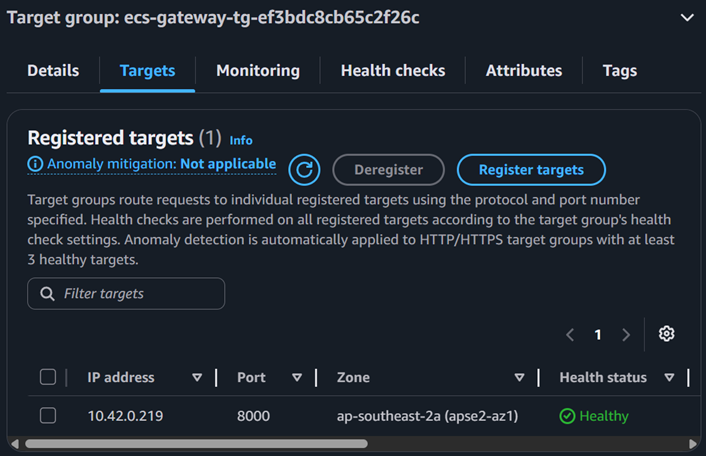
No Container healthCheck Support
Section titled “No Container healthCheck Support”In classic ECS, you can define a healthCheck command in the container definition (for example, curl localhost:8080/health) that the ECS agent runs inside the container. Express Mode omits this capability entirely. As a result, the ECS Tasks tab in the console displays Health status: Unknown for Express Mode tasks — this is expected and does not indicate a problem.
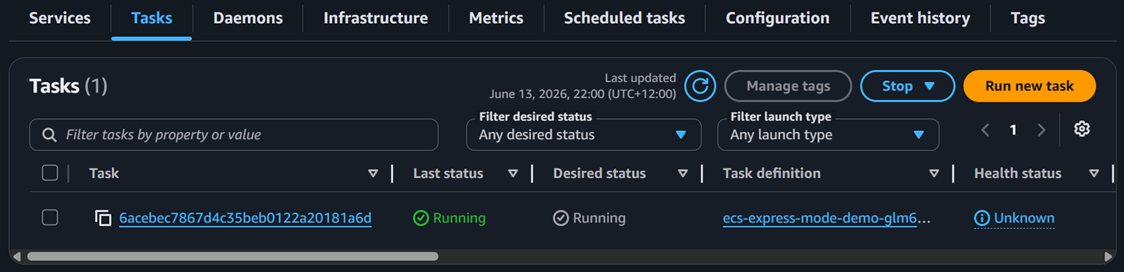
Operational health for Express Mode services is determined solely by the ALB target group status. If targets are registered and passing ALB health checks, the service is healthy regardless of what the ECS Tasks tab shows.
Implications for Debugging
Section titled “Implications for Debugging”Because Express Mode uses only ALB-level health checks, your debugging workflow differs from classic ECS:
| Scenario | Where to check |
|---|---|
| Tasks healthy and serving traffic | EC2 → Target Groups → Targets tab shows healthy |
| Tasks unhealthy or failing | EC2 → Target Groups → Targets tab shows unhealthy with a reason code |
| Health status Unknown in ECS | Normal for Express Mode — check ALB target group instead |
| Deployment rolling back | New tasks failed ALB health checks — inspect target group health reason and CloudWatch Logs |