Ingress Configuration
Overview
Section titled “Overview”When you deploy an Express Gateway Service
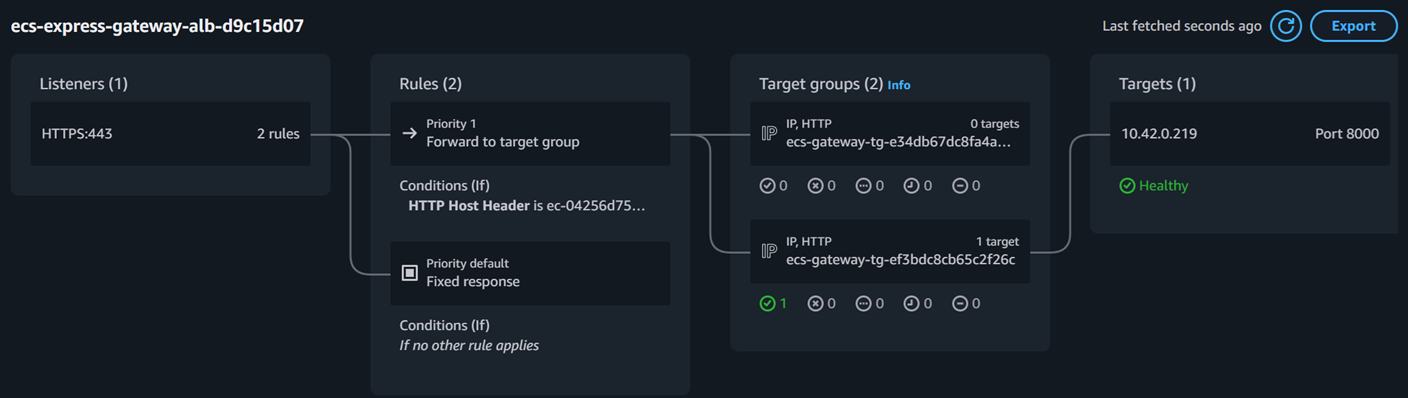
The aws_ecs_express_gateway_service Terraform resource that provisions an ECS service with managed ALB, auto scaling, and simplified configuration for HTTP/HTTPS web applications and APIs. , ECS Express Mode automatically provisions and configures the ingress layer — a with a listener, target group, and Host header routing rules. You do not create these resources in your Terraform code. Instead, Express Mode manages them and exposes their identifiers through the ingress_paths output attribute.
This page explains how Express Mode provisions the public ALB endpoint and documents the ingress_paths output containing the ALB DNS name, listener ARN, and target group ARN from the terraform-aws-ecs-express-mode-demo project.
How Express Mode Provisions Ingress
Section titled “How Express Mode Provisions Ingress”Express Mode handles the full ingress stack automatically when you create an Express Gateway Service
The aws_ecs_express_gateway_service Terraform resource that provisions an ECS service with managed ALB, auto scaling, and simplified configuration for HTTP/HTTPS web applications and APIs. . The provisioning sequence:
- ECS creates or reuses a in the VPC
Virtual Private Cloud — an isolated virtual network within AWS where resources are deployed. containing your specified subnets - A target group is registered for your service’s container port
- A listener rule with Host header matching routes traffic to the target group
- Each service receives a unique Application URL
The unique Express-provisioned HTTPS URL on *.ecs.<region>.on.aws used for all normal application traffic. on*.ecs.<region>.on.aws
The network configuration in your Express Gateway Service resource determines where the ALB is placed:
resource "aws_ecs_express_gateway_service" "this" {  # ...
network_configuration { subnets = aws_subnet.public[*].id security_groups = [aws_security_group.web.id] access_type = "PUBLIC" }}- subnets — the ALB and tasks are both placed in these subnets. Public Subnet
A subnet with a route to an Internet Gateway, enabling resources to have public IP addresses and internet access. produce an internet-facing ALB. - security_groups — applied to the tasks. The ALB receives its own managed security group automatically.
- access_type —
PUBLICcreates an internet-facing ALB;PRIVATEcreates an internal ALB reachable only within the VPC.
The ingress_paths Output
Section titled “The ingress_paths Output”After Express Mode provisions the ingress layer, the aws_ecs_express_gateway_service resource exposes an ingress_paths attribute containing the ALB DNS name, listener ARN, and target group ARN. You can surface these values with Terraform outputs:
output "alb_dns_name" {  description = "DNS name of the Express-managed ALB"  value       = aws_ecs_express_gateway_service.this.ingress_paths[0].alb_dns_name}
output "listener_arn" {  description = "ARN of the ALB listener managed by Express Mode"  value       = aws_ecs_express_gateway_service.this.ingress_paths[0].listener_arn}
output "target_group_arn" { description = "ARN of the target group registered for this service" value = aws_ecs_express_gateway_service.this.ingress_paths[0].target_group_arn}ingress_paths Structure
Section titled “ingress_paths Structure”The ingress_paths output is a list of objects. Each object contains three key fields:
| Field | Type | Description | Example Value |
|---|---|---|---|
alb_dns_name | string | Public DNS name of the Express-managed | express-abcdef12.us-east-1.elb.amazonaws.com |
listener_arn | string | ARN of the HTTPS listener created on the ALB | |
target_group_arn | string | ARN of the target group registered for this service’s tasks | |
ALB DNS Name vs Application URL
Section titled “ALB DNS Name vs Application URL”Express Mode exposes two endpoints, each serving a different purpose:
| Endpoint | Source | Purpose | Use For |
|---|---|---|---|
| ALB DNS name | ingress_paths[0].alb_dns_name | Raw load balancer hostname | Infrastructure diagnostics, verifying ALB health |
| Application URL The unique Express-provisioned HTTPS URL on *.ecs.<region>.on.aws used for all normal application traffic. | ECS console / | Express-managed HTTPS endpoint with Host header routing | All application traffic, curl tests, browser access |
Why Ingress Configuration Matters for Express Mode
Section titled “Why Ingress Configuration Matters for Express Mode”Understanding the ingress layer helps you adapt Express Mode to your environment:
- Diagnostics — the
target_group_arnlets you inspect target health in the EC2 console to debug unhealthy tasks or failed deployments - Monitoring — the
listener_arnand ALB DNS name help you locate CloudWatch metrics and access logs for the Express-managed load balancer - Integration — if you need to reference the ALB or target group in other Terraform resources (WAF associations, Route 53 aliases), the
ingress_pathsoutput provides the required ARNs - Network validation — confirming the ALB DNS name resolves and returns HTTP responses verifies that your VPC
Virtual Private Cloud — an isolated virtual network within AWS where resources are deployed. , subnets, and security groups are correctly configured for Express Mode